
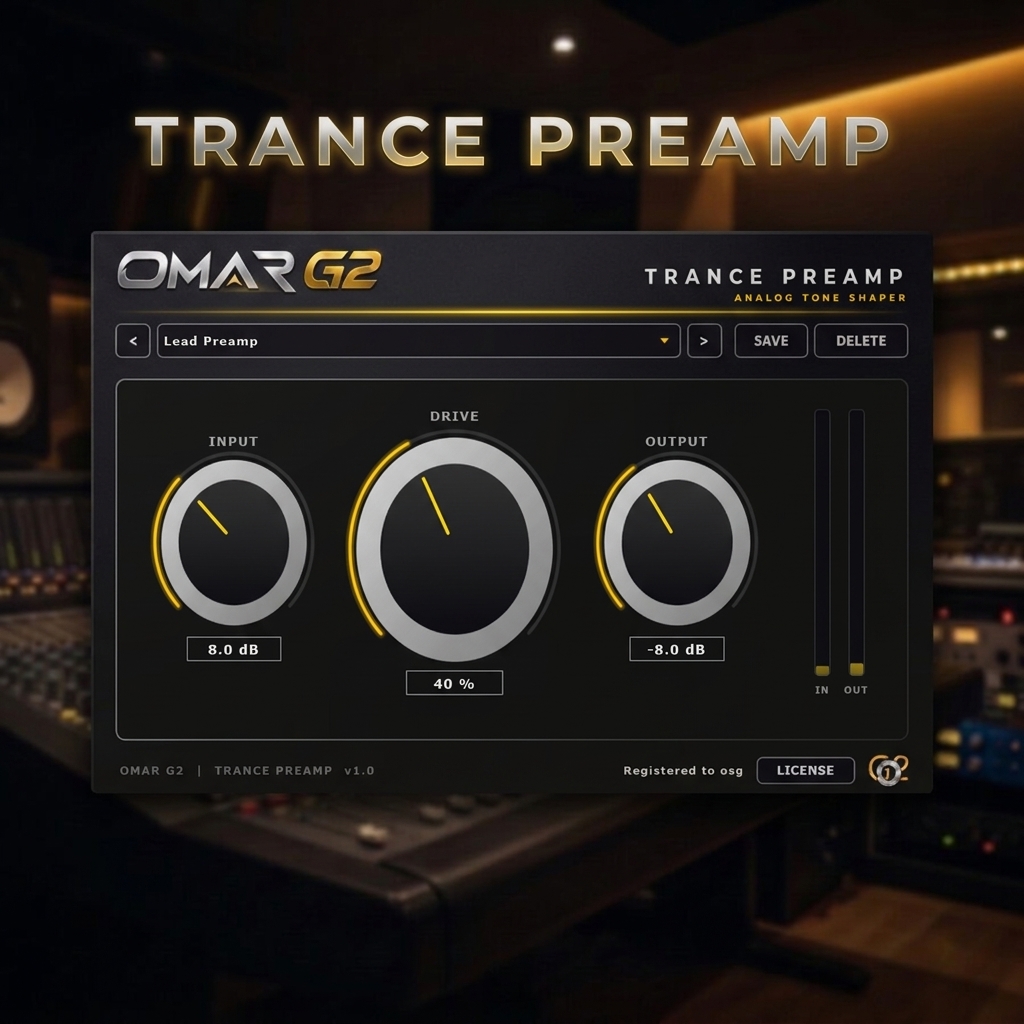
TRANCE PREAMP — Analog Tone Shaper VST3 for Trance
The first stage of your trance chain. Console-grade warmth, one plugin.
TRANCE PREAMP by OMAR G2 is an analog-style preamp VST3 designed to give your trance productions the character of a real console channel. Place it at the top of any track, group bus or mix bus and hear your supersaws sound bigger, your basslines gain body, your vocals find presence, and your mix come together.
With just three knobs — INPUT, DRIVE and OUTPUT — you get full control over the gain staging of your signal without ever leaving your DAW. It’s the “console channel” you’ve always wanted, tuned specifically for the trance genre.
TRY IT FREE — DOWNLOAD THE DEMO
Download the free demo and test TRANCE PREAMP in your own productions. The demo is fully functional — the audio is muted for a few seconds at regular intervals until you activate a license.
SHA-256 CHECKSUM
ffa27d039e4abe9feb673aa0fd88741c7a3789e01cdab5ef65c9a124e5ca99b1
Verify the integrity of TrancePreamp-Demo-v1.0.0.zip by comparing this code with the one you get after downloading. If they match, the file is correct.
How to verify the SHA-256 on Windows
Option A — PowerShell (recommended):
Get-FileHash "$env:USERPROFILE\Downloads\TrancePreamp-Demo-v1.0.0.zip" -Algorithm SHA256
Option B — Command Prompt (CMD):
certutil -hashfile "%USERPROFILE%\Downloads\TrancePreamp-Demo-v1.0.0.zip" SHA256
Option C — 7-Zip / WinRAR:
Right-click the .zip → CRC SHA → SHA-256 (7-Zip) or File Properties → Checksums (WinRAR).
The output is case-insensitive. Ignore spaces and line breaks when comparing.
VST3 · Windows 10/11 64-bit · ~5 MB · No signup required
WHY TRANCE PREAMP?
Most preamp plugins on the market are either complex emulations of historical hardware or one-trick saturation tools. TRANCE PREAMP takes a different approach: it’s a modern analog-style preamp designed specifically for trance, with just the three controls that matter and nothing else.
- Warm, musical character — modeled after the asymmetric response of a triode valve, giving your tracks even-order harmonics that sound expensive, not harsh.
- Three knobs, total control — INPUT, DRIVE and OUTPUT cover everything you need for proper gain staging and tone shaping.
- Works on any source — leads, bass, kick, pads, vocals, drums, and even your master bus.
- 12 trance presets — organized by function (Console Clean, Warm, Drive, Neve-style, SSL-style, API-style) and by instrument (Kick, Bass, Lead, Pad, Vocal, Master).
- IN/OUT meters — dB-scaled meters with smooth decay so you can dial in the right level at a glance.
- Instant workflow — no menus, no hidden options. Load it, set the three knobs, done.
WHAT IT DOES
TRANCE PREAMP is a single-stage analog preamp. Its purpose is simple: it gives your signal the character of a real console channel before any other processing.
INPUT — Real Gain
The INPUT knob boosts the level of your signal before it hits the circuit. Push it higher to drive the preamp harder and get more character. It’s the same as the gain knob on a real console channel.
DRIVE — Analog Character
The DRIVE knob controls how much analog character the circuit adds. At 0% the preamp is transparent. At 100% it delivers the full warmth of the triode-style saturation curve. Turn it up and hear your tracks come alive.
OUTPUT — Level Compensation
Use the OUTPUT knob to compensate the level you added with INPUT and DRIVE. This lets you push the circuit hard for character while keeping the final level at unity, so you can A/B honestly.
WHERE TO USE IT IN YOUR DAW
TRANCE PREAMP is designed to be the first processor in your chain — right after the instrument or audio clip, before EQ, compression or saturation.
A typical trance chain looks like this:
Source → TRANCE PREAMP → EQ → Compressor → Saturator → ...
         ↑
    You are here
Here are real examples of where to insert it in your project:
- Lead supersaw track — Put it first, before EQ. INPUT +8, DRIVE 35%. The supersaw gets bigger and warmer without harshness.
- Rolling bassline — First in the bass chain. INPUT +6, DRIVE 30%. The bass gains body and presence that translates on any system.
- Kick track — First, before EQ. INPUT +4, DRIVE 20%. Controlled weight without muddying the low end.
- Group bus (drums, synths, vocals) — First slot of the group. INPUT +3, DRIVE 20%. Gives the group cohesion before any other processing.
- Mix bus (pre-master) — First slot of your mix bus. INPUT +2, DRIVE 15%. Glue and polish for the whole mix.
- Master bus — Optional, with very low settings. INPUT +1, DRIVE 10%. Subtle “console” character across the whole project.
Rule of thumb: the earlier in the chain, the better. TRANCE PREAMP is a gain-staging tool, not an effect. It belongs at the beginning.
THE ANALOG MODELS BEHIND THE PRESETS
The 12 factory presets are inspired by three classic preamp styles that have shaped trance production for decades. TRANCE PREAMP is not a circuit emulation — it’s a musical interpretation of their character, tuned for trance.
Neve-style (Warm and Thick)
Inspired by the classic British console preamps. Rich low-mid body, smooth top end, and a presence that sits beautifully in a mix. Use it when your lead or vocal needs weight and warmth without harshness.
SSL-style (Defined and Punchy)
Inspired by British large-format consoles. Tighter low end, more definition in the high mids, and a punchy attack that cuts through the mix. Ideal for drums, percussion, and any source that needs to sound “forward”.
API-style (Present and Punchy)
Inspired by American console preamps. Emphasis on the midrange, with an upfront presence and a controlled low end. Perfect for kicks, snares, and plucks that need to punch through.
THE 12 PRESETS
By Function
- Console Clean — Transparent. Use it when you just need proper gain staging.
- Console Warm — Subtle warmth. Perfect for pads and vocals.
- Console Drive — Audible character. For leads and basslines that need attitude.
- Neve-Style — Warm and thick. For leads, vocals and the mix bus.
- SSL-Style — Defined and punchy. For drums, percussion and synths.
- API-Style — Present and upfront. For kick, snare and any source that needs punch.
By Instrument
- Kick Preamp — Controlled weight without muddying the low end.
- Bass Preamp — Body and presence that translates on any system.
- Lead Preamp — Warm presence without harshness.
- Pad Preamp — Gentle warmth for sustained textures.
- Vocal Preamp — Body and air in equal measure.
- Master Preamp — Subtle glue for your mix bus.
FEATURED PRESETS — START HERE
While all 12 presets are useful, two of them are the “flagship” settings of TRANCE PREAMP. If you’re new to the plugin, start with one of these two and explore from there.
Console Warm — The All-Rounder
Character: Subtle warmth with gentle body. Clean enough to keep the source intact, warm enough to feel the analog character. This is the “console glue” preset.
Suggested settings: INPUT +4 dB, DRIVE 30%, OUTPUT −5 dB.
Best for:
- Pads and atmospheres — Adds a soft blanket of warmth without losing the air.
- Vocals — Body and presence without harshness. Especially good on trance vocals.
- Supersaws — Rounds off the digital edges and makes the stack sound like one instrument.
- Mix bus — If you want just one preset for the entire mix, this is it.
Why it works: Console Warm is calibrated to sit right in the “sweet spot” of the triode curve — enough drive for the harmonics to be audible, not so much that it colours the source. It’s the preset that makes your tracks sound “expensive” without you knowing exactly why.
Console Drive — The Character Preset
Character: Audible analog character with attitude. The harmonics are clearly present, the top end is slightly compressed, and the source sounds bigger and more forward. This is the “console pushed hard” preset.
Suggested settings: INPUT +10 dB, DRIVE 55%, OUTPUT −10 dB.
Best for:
- Leads — Presence and bite without sounding harsh or digital.
- Basslines — Body and character that translates on any system.
- Plucks and arps — Adds weight and definition to otherwise thin sounds.
- Percussion loops — Glue with attitude for drum loops.
- Group buses — Cohesion with a clear analog signature.
Why it works: Console Drive pushes the circuit enough that the triode saturation becomes the dominant character of the sound. It’s the preset that says “there’s something analog happening here” — and it’s what producers mean when they say a track sounds “warm but present”.
Console Warm vs Console Drive — Which One?
| Use case | Preset |
|---|---|
| I want my track to sound bigger but still clean | Console Warm |
| I want my track to clearly sound “analog” | Console Drive |
| Pads, vocals, atmospheres, mix bus | Console Warm |
| Leads, bass, plucks, percussion, group buses | Console Drive |
| First time using a preamp plugin | Console Warm (safer) |
| You’ve used saturation plugins before | Console Drive (more fun) |
Pro tip: try Console Warm on a track first, then switch to Console Drive and compare. The difference is immediate. Console Warm “warms”, Console Drive “drives”. Both are useful, both sound great — just for different purposes.
HOW TO USE THE PRESETS
Load a preset, then adjust to taste. Here’s a suggested workflow:
- Start with a preset that matches your source. Lead → “Lead Preamp”. Kick → “Kick Preamp”.
- Push INPUT until you hear the character you want. Watch the IN meter to see how hard you’re driving the circuit.
- Adjust DRIVE to taste. 0% for transparent, 100% for full character.
- Compensate with OUTPUT so the level matches the bypass. This lets you A/B honestly.
- Save as user preset if you want to reuse the setting on another track.
KEY FEATURES
- Analog-style preamp with triode-inspired saturation curve
- Three knobs: INPUT, DRIVE, OUTPUT — nothing else
- 12 presets organized by function and instrument
- IN / OUT meters with dB scaling and smooth decay
- Automatic gain compensation for smooth gain staging
- Soft clip protection at the output stage
- Preset system with user save/load/delete
- Full automation — every parameter automatable in your DAW
- Low CPU — can run on every channel of a full session
- Compact interface — 820 × 460, fits any screen
DESIGNED FOR TRANCE PRODUCERS
TRANCE PREAMP is not a generic preamp plugin. It was designed from the ground up for trance production. Every decision — the character curve, the preset selection, the interface — was made with trance producers in mind.
Use it on:
- Uplifting trance — Warmth and presence for supersaws, pads and leads.
- Psytrance — Gain staging and character for rolling basslines and acid leads.
- Progressive trance — Subtle warmth for pads and atmospheric textures.
- Tech trance — Punch and presence for drums and stabs.
Whether you’re producing a peak-time banger or an emotional breakdown, TRANCE PREAMP gives your mix the analog character it deserves.
OMAR G2 — Peak-Time Emotional Energy. Classic Trance, Recharged.
ALREADY TRIED THE DEMO?
If you’ve tested TRANCE PREAMP and want to remove the demo limitations, purchase a license below. Your activation key will be sent to your email immediately after checkout.
BUY TRANCE PREAMP — INSTANT LICENSE
Secure checkout · Instant delivery by email · 2 activations included
INSTALLATION GUIDE
TRANCE PREAMP is delivered as a ZIP file containing the VST3 plugin. No external libraries or additional files are required — everything is bundled inside the plugin.
Step 1 — Download
Download TrancePreamp-Demo-v1.0.0.zip from the demo section above, or from the link sent to your email after purchase.
Step 2 — Extract the ZIP file
Right-click the ZIP and choose Extract All… (Windows built-in), 7-Zip or WinRAR. Inside you will find:
Trance Preamp.vst3
Step 3 — Copy the plugin to the VST3 folder
Copy the Trance Preamp.vst3 folder into:
C:\Program Files\Common Files\VST3
Approve the administrator prompt if Windows asks. That’s it — no DLL, no installer, no dependencies.
Step 4 — Open your DAW
Launch your DAW and run a plugin rescan / refresh the VST3 list if needed.
Step 5 — Load TRANCE PREAMP and activate
Find TRANCE PREAMP in your DAW’s VST3 browser, load it on a track, click ACTIVATE in the plugin footer, paste your license key, and you’re ready to add analog character to your trance productions.
IMPORTANT NOTES
- Designed for Windows 10/11 64-bit, VST3 format only.
- Requires a VST3-compatible DAW (Ableton Live, FL Studio, Cubase, Studio One, Reaper, Bitwig, etc.).
- No external DLLs or runtimes are required — all dependencies are built into the plugin.
- Your DAW may need to rescan plugins after installation.
- If the plugin doesn’t appear, verify the
Trance Preamp.vst3folder is placed insideC:\Program Files\Common Files\VST3.
SUPPORT & GUARANTEE
Every purchase includes email support and a 14-day money-back guarantee — if TRANCE PREAMP doesn’t fit your workflow, contact us for a full refund, no questions asked.
Need help? Write to hello@omarg2.com and we’ll get back to you within 24 hours.
Reviews
There are no reviews yet.