
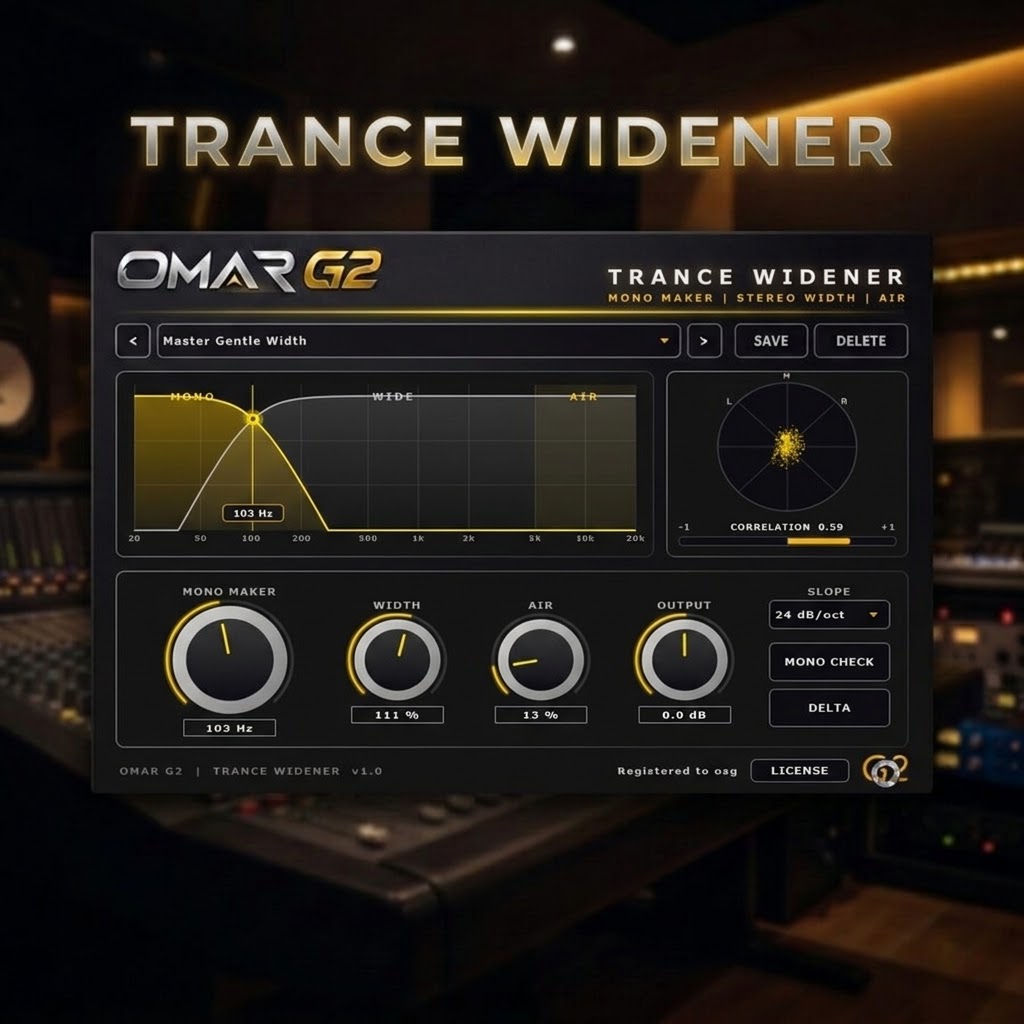
TRANCE WIDENER — Mono Maker & Stereo Width VST3 for Trance
The stereo plugin built for trance. Mono bass, wide leads, real Linkwitz-Riley crossover.
TRANCE WIDENER by OMAR G2 is a stereo widening VST3 designed from the ground up for the trance workflow. Most wideners give you width but destroy your low end and ruin mono compatibility — TRANCE WIDENER solves the problem every trance producer knows: you want wide leads and a mono bass, without sacrificing either.
With a real Linkwitz-Riley crossover, a dedicated MONO MAKER, separate WIDTH and AIR controls, and DELTA monitoring, you get surgical control over the stereo field of your mix — tuned specifically for the trance genre.
TRY IT FREE — DOWNLOAD THE DEMO
Download the free demo and test TRANCE WIDENER in your own productions. The demo is fully functional — the audio is muted for a few seconds at regular intervals until you activate a license.
SHA-256 CHECKSUM
e86ac9cfbb7548d1e1a8701693fb7d525cf88dea6a11f7bfc2eab22b209e2c4c
Verify the integrity of TranceWidener-Demo-v1.0.0.zip by comparing this code with the one you get after downloading. If they match, the file is correct.
How to verify the SHA-256 on Windows
Option A — PowerShell (recommended):
Get-FileHash "$env:USERPROFILE\Downloads\TranceWidener-Demo-v1.0.0.zip" -Algorithm SHA256
Option B — Command Prompt (CMD):
certutil -hashfile "%USERPROFILE%\Downloads\TranceWidener-Demo-v1.0.0.zip" SHA256
Option C — 7-Zip / WinRAR:
Right-click the .zip → CRC SHA → SHA-256 (7-Zip) or File Properties → Checksums (WinRAR).
The output is case-insensitive. Ignore spaces and line breaks when comparing.
VST3 · Windows 10/11 64-bit · ~5 MB · No signup required
WHY TRANCE WIDENER?
Most stereo wideners on the market are generic. They give you width but destroy your low-end punch and ruin mono compatibility. TRANCE WIDENER takes a different approach: it’s a precision stereo tool designed specifically for trance, with a real Linkwitz-Riley crossover and just the controls that matter.
- Real Linkwitz-Riley crossover — 12, 24 or 48 dB/oct. Phase-aligned bands that sum flat. Not a simple shelf filter.
- MONO MAKER — everything below your cutoff frequency (bass, kick) is summed to mono surgically. Guaranteed mono compatibility.
- Separate WIDTH & AIR controls — widen your mids and highs without touching the low end. AIR acts above 5 kHz.
- DELTA monitoring — hear only what the plugin is adding or removing. The fastest way to verify you’re not destroying information.
- PHASE SAFE Mono Check — one click to listen in mono. If it sounds good in mono, it will sound good anywhere.
- Full visualization — correlation goniometer and interactive frequency graph. You always see exactly what’s happening.
- 12 trance presets — for kick, bass, leads, pads, hats, breakdowns and mastering.
- Instant workflow — no menus, no hidden options. Load it, move the four knobs, done.
WHAT IT DOES
TRANCE WIDENER is a phase-safe stereo processor. Its purpose is simple: it separates your signal into a mono low band and a stereo high band using a real Linkwitz-Riley crossover, then lets you control the width and air of the highs independently — while the lows stay glued to mono.
MONO MAKER — Real Mono Below Cutoff
The MONO MAKER knob sets the crossover frequency (20 Hz to 500 Hz). Everything below that frequency is summed to mono. Push it up to lock the kick and bass to mono, or keep it low to only catch the sub. This is the core of the plugin — it’s what guarantees your mix translates on a club system, on a mono radio, and on any PA.
SLOPE — Crossover Steepness
The SLOPE control selects the Linkwitz-Riley slope: 12, 24 or 48 dB/oct. LR4 (24 dB/oct) is the sweet spot — transparent and clean. LR2 is gentler, LR8 is surgical. Pick according to how much separation you need between the mono bass and the wide mids.
WIDTH — Stereo Expansion
The WIDTH knob expands or contracts the stereo field of everything above the crossover frequency. At 100% it’s neutral. Above 100% widens. Below 100% narrows. Use it to open up leads, pads and FX without touching the low end.
AIR — High Frequency Width
The AIR knob adds extra stereo width specifically above 5 kHz. At 0% it’s off. At 100% it delivers the airy, spacious top end that defines modern trance. Perfect for hats, risers and psytrance leads.
OUTPUT — Level Compensation
Use the OUTPUT knob to compensate for the loudness increase that widening naturally brings. This lets you A/B honestly against the bypass. Range: −12 dB to +12 dB.
DELTA — Monitoring Tool
The DELTA button lets you hear only the difference between the processed signal and the dry signal. It’s the fastest way to verify exactly what the plugin is doing — and to make sure you’re not destroying important stereo information.
MONO CHECK — Phase Verifier
The MONO CHECK button sums your output to mono. If the mix still sounds full and balanced, your phase is safe. If it collapses, you have a phase problem. Use it constantly.
WHERE TO USE IT IN YOUR DAW
TRANCE WIDENER is designed to be used anywhere in your chain where stereo width matters — but its most important role is on the mix bus, before the limiter.
A typical mastering chain looks like this:
Source → EQ → Compressor → Saturator → TRANCE WIDENER → Limiter → Output
                                                 ↑
                                            You are here
Here are real examples of where to insert it in your project:
- Lead supersaw bus — MONO MAKER at 100 Hz, WIDTH 140%, AIR 30%. Wide, bright lead that still translates in mono.
- Rolling bassline bus — MONO MAKER at 200 Hz with SLOPE LR8, WIDTH 100%. Bass stays mono, no phase issues in the club.
- Kick + bass group — MONO MAKER at 250 Hz with SLOPE LR8. Everything below 250 Hz locked to mono. Guaranteed weight.
- Pads and atmospheres — MONO MAKER at 120 Hz, WIDTH 170%, AIR 50%. Huge stereo spread without muddying the low end.
- Hats and percussion bus — MONO MAKER at 80 Hz, WIDTH 180%, AIR 80%. Airy, wide top end that cuts through.
- Mix bus (pre-master) — MONO MAKER at 100 Hz, WIDTH 115%, AIR 20%. Gentle polish and mono safety for the whole mix.
- Master bus — MONO MAKER at 80 Hz, WIDTH 110%, AIR 0%. Optional and very subtle. Use only if the mix needs it.
Rule of thumb: the closer to the mix bus, the gentler the settings. On individual tracks you can be aggressive. On the mix bus, be surgical.
THE CROSSOVER — WHY LINKWITZ-RILEY MATTERS
The MONO MAKER uses a real Linkwitz-Riley crossover, the same topology used in high-end studio monitors and mastering-grade crossovers. It’s not a simple shelf filter — it’s a proper two-way split where the low band and high band sum back together with a flat magnitude response and no phase cancellation.
Why this matters for trance
When you split a signal at 120 Hz with a cheap filter, the two bands don’t sum correctly at the crossover point. You get a small dip in the frequency response, and more importantly, phase cancellation in mono. Linkwitz-Riley solves both problems. It guarantees the split is transparent — you only hear the change you intentionally made.
LR2, LR4, LR8 — Which one?
- LR2 (12 dB/oct) — Gentle slope. Musical, subtle. Good for very clean mixes or mastering.
- LR4 (24 dB/oct) — The sweet spot. Transparent and clean. Use this by default.
- LR8 (48 dB/oct) — Very steep. Surgical separation. Use when you have a busy low-end and need the mono band to end abruptly.
THE 12 PRESETS
By Function
- Init (Neutral) — Starting point. No widening, no mono maker.
- Master Gentle Width — Subtle bus widening. Safe for mastering.
- Bass Safe — Aggressive mono maker (300 Hz, LR4) with narrow width. For bass-heavy tracks.
- Kick + Bass Mono — Full mono maker (300 Hz, LR8). Kick and bass locked to mono.
- Mono Below 150 (Soft) — Gentle mono maker at 150 Hz. Great for pads and leads over a busy low-end.
- Subtle Air — Just a touch of air (50%) and neutral width. For delicate top-end polish.
By Instrument
- Supersaw Wide — Signature trance sound. 150% width, subtle air.
- Lead Air — Wide lead with strong air (70%). For uplifting and progressive leads.
- Pad Spread — Very wide pads (170%) with air. For breakdowns and intros.
- Pluck Stereo — Balanced widening for plucks and arps.
- Hats Wide — Aggressive width for hi-hats (180%) with strong air (80%).
- Breakdown Huge — Extreme width (200%) and air (90%) for breakdowns and risers.
FEATURED PRESETS — START HERE
While all 12 presets are useful, two of them are the “flagship” settings of TRANCE WIDENER. If you’re new to the plugin, start with one of these two and explore from there.
Supersaw Wide — The All-Rounder
Character: Balanced widening with subtle air. Wide enough to open up your leads, mono enough to keep the low end tight. This is the “everyday trance” preset.
Suggested settings: MONO MAKER 150 Hz, SLOPE LR4, WIDTH 150%, AIR 35%, OUTPUT −1 dB.
Best for:
- Supersaw leads — Wide, bright, still glued to the mono bass.
- Plucks and arps — Adds width and definition to thin sounds.
- Synth groups — Cohesion with a clear stereo signature.
- Mix bus — If you want just one preset for the entire mix, this is it.
Why it works: Supersaw Wide is calibrated to sit right in the “sweet spot” of the crossover — enough widening for the stereo image to open up, not so much that the low end gets muddy. It’s the preset that makes your trance tracks sound “big” without you knowing exactly why.
Bass Safe — The Protection Preset
Character: Aggressive mono maker with narrow width. Everything below 300 Hz is locked to mono, and the stereo field above stays controlled. This is the “club translation” preset.
Suggested settings: MONO MAKER 300 Hz, SLOPE LR4, WIDTH 60%, AIR 0%, OUTPUT 0 dB.
Best for:
- Kick and bass — Full mono guarantee. No phase issues in the club.
- Sub-bass lines — Body and weight that translates on any system.
- Rolling basslines — No risk of phase cancellation at high volume.
- Mix bus of bass-heavy tracks — The safety net for problematic mixes.
Why it works: Bass Safe pushes the crossover high enough (300 Hz) that everything relevant to the club weight is locked to mono. The narrow WIDTH above the crossover prevents any phase weirdness from creeping back in. It’s the preset that says “this will sound good in mono, guaranteed”.
Supersaw Wide vs Bass Safe — Which One?
| Use case | Preset |
|---|---|
| I want my leads and pads to sound wide and open | Supersaw Wide |
| I want to guarantee my bass translates in mono | Bass Safe |
| Leads, pads, plucks, supersaws, mix bus | Supersaw Wide |
| Kick, bass, sub, rolling basslines, problematic mixes | Bass Safe |
| First time using a widener plugin | Supersaw Wide (safer) |
| You need club-level mono guarantees | Bass Safe (mandatory) |
Pro tip: try Supersaw Wide on a lead track first, then switch to Bass Safe and compare. The difference is immediate. Supersaw Wide “opens”, Bass Safe “protects”. Both are useful, both sound great — just for different purposes.
HOW TO USE THE PRESETS
Load a preset, then adjust to taste. Here’s a suggested workflow:
- Start with a preset that matches your source. Lead → “Supersaw Wide”. Kick + bass → “Bass Safe”.
- Set the MONO MAKER frequency. Start at 120 Hz. Push it up if the low end is busy, keep it low if the mix is clean.
- Choose the SLOPE. LR4 (24 dB/oct) is the default. LR8 for surgical separation, LR2 for gentle correction.
- Adjust WIDTH to taste. 100% is neutral. 120–150% for subtle widening, 150–200% for aggressive.
- Add AIR if needed. 20–40% for subtle sparkle, 60–80% for airy psytrance leads or hats.
- Compensate with OUTPUT so the level matches the bypass. This lets you A/B honestly.
- Verify with MONO CHECK and DELTA. If it sounds good in mono and the DELTA signal is only what you intended to change, you’re done.
- Save as user preset if you want to reuse the setting on another track.
KEY FEATURES
- Real Linkwitz-Riley crossover — 12, 24 or 48 dB/oct. Phase-aligned, sums flat.
- MONO MAKER — 20 to 500 Hz. Everything below cutoff locked to mono.
- WIDTH — 0% to 200%. Separate stereo control for the high band.
- AIR — 0% to 100%. Extra width above 5 kHz.
- OUTPUT — −12 to +12 dB. Level compensation.
- DELTA monitoring — hear only what the plugin is doing.
- MONO CHECK — instant phase verification.
- Correlation meter — real-time phase display.
- Interactive frequency graph — draggable crossover marker.
- Correlation goniometer — visual stereo field display.
- 12 factory presets organized by function and instrument.
- Full automation — every parameter automatable in your DAW.
- Low CPU — can run on every channel of a full session.
- Compact interface — 820 × 570, fits any screen.
DESIGNED FOR TRANCE PRODUCERS
TRANCE WIDENER is not a generic stereo plugin. It was designed from the ground up for trance production. Every decision — the crossover slope, the preset selection, the interface — was made with trance producers in mind.
Use it on:
- Uplifting trance — Wide supersaws, airy leads and open pads without muddying the bass.
- Psytrance — Surgical mono control for rolling basslines and acid leads with extreme width on top.
- Progressive trance — Subtle width and mono safety for the whole mix.
- Tech trance — Wide percussive elements with a locked-in low end.
Whether you’re producing a peak-time banger or an emotional breakdown, TRANCE WIDENER gives your mix the stereo depth it deserves.
OMAR G2 — Peak-Time Emotional Energy. Classic Trance, Recharged.
ALREADY TRIED THE DEMO?
If you’ve tested TRANCE WIDENER and want to remove the demo limitations, purchase a license below. Your activation key will be sent to your email immediately after checkout.
BUY TRANCE WIDENER — INSTANT LICENSE
Secure checkout · Instant delivery by email · 2 activations included
INSTALLATION GUIDE
TRANCE WIDENER is delivered as a ZIP file containing the VST3 plugin. No external libraries or additional files are required — everything is bundled inside the plugin.
Step 1 — Download
Download TranceWidener-Demo-v1.0.0.zip from the demo section above, or from the link sent to your email after purchase.
Step 2 — Extract the ZIP file
Right-click the ZIP and choose Extract All… (Windows built-in), 7-Zip or WinRAR. Inside you will find:
Trance Widener.vst3
Step 3 — Copy the plugin to the VST3 folder
Copy the Trance Widener.vst3 folder into:
C:\Program Files\Common Files\VST3
Approve the administrator prompt if Windows asks. That’s it — no DLL, no installer, no dependencies.
Step 4 — Open your DAW
Launch your DAW and run a plugin rescan / refresh the VST3 list if needed.
Step 5 — Load TRANCE WIDENER and activate
Find TRANCE WIDENER in your DAW’s VST3 browser, load it on a track, click ACTIVATE in the plugin footer, paste your license key, and you’re ready to add stereo depth to your trance productions.
IMPORTANT NOTES
- Designed for Windows 10/11 64-bit, VST3 format only.
- Requires a VST3-compatible DAW (Ableton Live, FL Studio, Cubase, Studio One, Reaper, Bitwig, etc.).
- No external DLLs or runtimes are required — all dependencies are built into the plugin.
- Your DAW may need to rescan plugins after installation.
- If the plugin doesn’t appear, verify the
Trance Widener.vst3folder is placed insideC:\Program Files\Common Files\VST3.
SUPPORT & GUARANTEE
Every purchase includes email support and a 14-day money-back guarantee — if TRANCE WIDENER doesn’t fit your workflow, contact us for a full refund, no questions asked.
Need help? Write to hello@omarg2.com and we’ll get back to you within 24 hours.
Reviews
There are no reviews yet.