
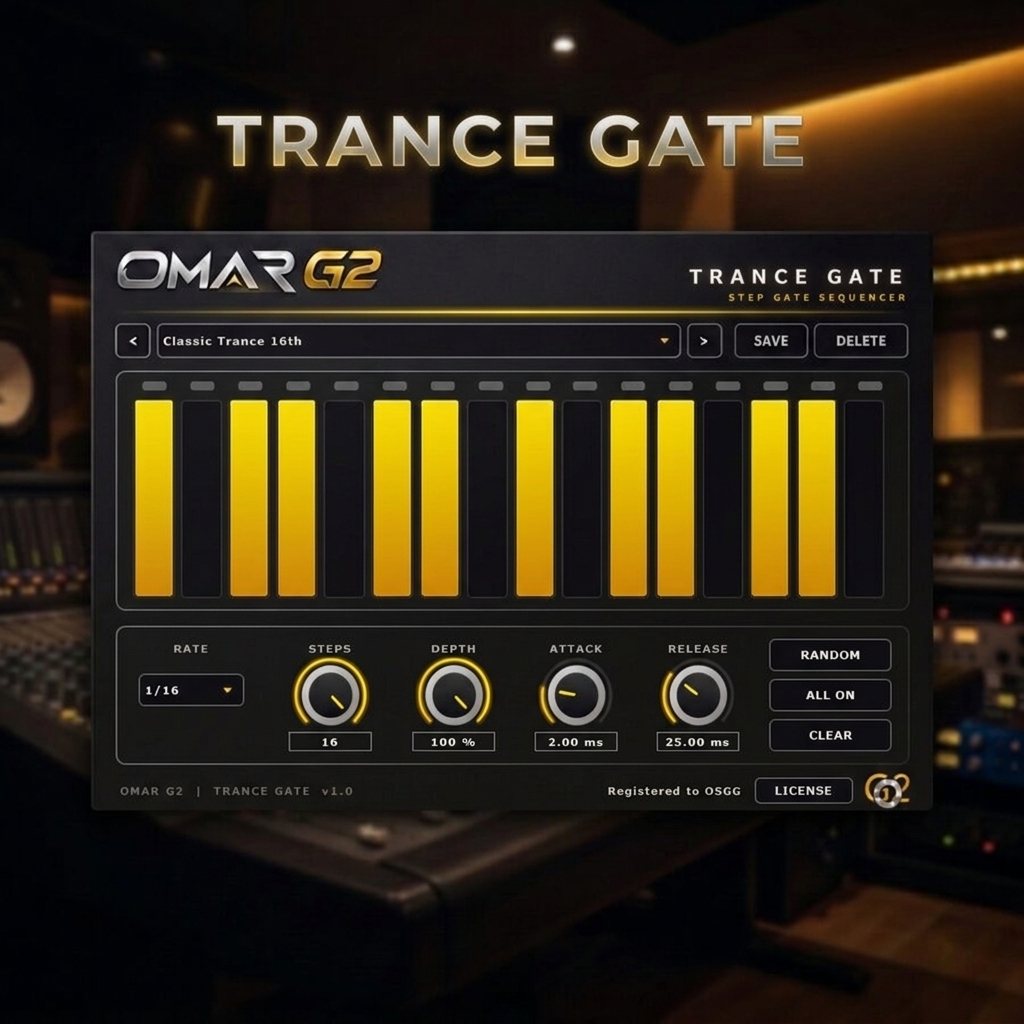
TRANCE GATE — 16-Step Trance Gate Sequencer VST3
Create movement. Shape the rhythm. Elevate your trance.
TRANCE GATE by OMAR G2 is a rhythmic gate sequencer VST3 designed to bring precision, movement, and expressive volume modulation to your electronic music productions. Whether you produce uplifting trance, psytrance, progressive trance or tech trance, TRANCE GATE gives you a direct and flexible way to shape rhythmic energy in seconds.
With a flexible 16-step sequencer, host-synchronized timing, adjustable gate depth, and smooth Attack and Release controls, you can create everything from classic trance gating patterns to intricate rhythmic variations and fluid, evolving textures.
TRY IT FREE — DOWNLOAD THE DEMO
Download the free demo and test TRANCE GATE in your own productions. The demo is fully functional — the audio is muted for 1.5 seconds every 30 seconds until you activate a license. No registration required.
VST3 · Windows 10/11 64-bit · ~5 MB · No signup required
SHA-256 CHECKSUM
fad038c4a21f83e89cad00b6ba4ba652eecf3cd19148dbf1d54a5595a601f2d2
Verify the integrity of TranceGate-Demo-v1.0.0.zip by comparing this code with the one you get after downloading. If they match, the file is correct.
WHY TRANCE GATE?
Most DAWs include basic gate tools, but they lack the musicality and precision that trance production demands. TRANCE GATE was built specifically for the genre:
- Designed for trance producers — patterns, rates and presets inspired by uplifting, psy and progressive trance.
- Musical, not surgical — adjustable depth and smooth attack/release keep the gate sounding natural, never choppy.
- Host-synced — your pattern stays aligned with the timeline, even when you jump to another position.
- Fast workflow — Random, All On and Clear let you explore new ideas in seconds.
- Automation-ready — every parameter is automatable and recalled with your DAW project.
KEY FEATURES
16-Step Programmable Sequencer
Shape every step independently, from fully closed (0) to fully open (1). Intermediate levels let you introduce accents, dynamics, and more expressive rhythmic patterns.
Host-Synchronized Timing
TRANCE GATE follows your DAW’s BPM and musical position using PPQ synchronization. Your pattern stays aligned with the timeline, including when you jump to another position during playback.
Six Rhythmic Rates
Choose from six timing divisions to create different rhythmic feels:
- 1/4
- 1/8
- 1/8T
- 1/16
- 1/16T
- 1/32
Flexible Pattern Length
Set the sequence length from 2 to 16 steps. Create conventional patterns or experiment with unusual lengths, such as 12 or 14 steps, for more varied rhythmic movement.
Adjustable Gate Depth
Control how deeply the signal is gated. At 100%, the closed portions are fully muted; lower settings preserve some signal for subtler, more transparent modulation.
Attack & Release
Shape the transitions between open and closed steps. Lower settings create sharper, more aggressive gating, while higher settings produce smoother, more flowing results.
Instant Pattern Controls
Explore new ideas quickly with dedicated Random, All On, and Clear functions. An LED step indicator helps you follow the sequence during playback.
Trance Presets & Custom Patterns
Get started quickly with 32 included presets inspired by trance production, then save your own patterns for future sessions.
Automation & Project Recall
All parameters are automatable, allowing you to introduce rhythmic changes throughout your arrangement. Settings are saved with your DAW project for a consistent workflow when reopening your sessions.
DESIGNED FOR TRANCE PRODUCERS
Use TRANCE GATE to add rhythmic movement to synthesizers, pads, sustained chords, atmospheric textures, and other suitable audio sources.
Whether you’re producing uplifting trance, melodic passages, breakdowns, or high-energy peak-time sections, TRANCE GATE gives you a direct and flexible way to shape rhythmic energy.
OMAR G2 — Peak-Time Emotional Energy. Classic Trance, Recharged.
ALREADY TRIED THE DEMO?
If you’ve tested TRANCE GATE and want to remove the demo limitations, purchase a license below. Your activation key will be sent to your email immediately after checkout.
BUY TRANCE GATE — INSTANT LICENSE
Secure checkout · Instant delivery by email · 2 activations included
INSTALLATION GUIDE
TRANCE GATE is delivered as a ZIP file containing the VST3 plugin. No external libraries or additional files are required — everything is bundled inside the plugin.
Step 1 — Download
Download TranceGate-Demo-v1.0.0.zip from the demo section above, or from the link sent to your email after purchase.
Step 2 — Extract the ZIP file
Right-click the ZIP and choose Extract All… (Windows built-in), 7-Zip or WinRAR. Inside you will find:
Trance Gate.vst3
Step 3 — Copy the plugin to the VST3 folder
Copy the Trance Gate.vst3 folder into:
C:\Program Files\Common Files\VST3
Approve the administrator prompt if Windows asks. That’s it — no DLL, no installer, no dependencies.
Step 4 — Open your DAW
Launch your DAW and run a plugin rescan / refresh the VST3 list if needed.
Step 5 — Load TRANCE GATE and activate
Find TRANCE GATE in your DAW’s VST3 browser, load it on a track, click ACTIVATE in the plugin footer, paste your license key, and you’re ready to create rhythmic gate patterns for your productions.
VERIFY YOUR DOWNLOAD
After downloading the demo ZIP, you can verify that the file is intact and authentic by checking its SHA-256 checksum.
SHA-256:
fad038c4a21f83e89cad00b6ba4ba652eecf3cd19148dbf1d54a5595a601f2d2
Windows (PowerShell)
Open PowerShell and run (adjust the path to where you saved the file):
Get-FileHash -Path "C:\Users\YourName\Downloads\TranceGate-Demo-v1.0.0.zip" -Algorithm SHA256
Windows (Command Prompt)
Open Command Prompt and run:
certutil -hashfile "C:\Users\YourName\Downloads\TranceGate-Demo-v1.0.0.zip" SHA256
If the resulting hash matches the SHA-256 above, your file is intact and authentic. If it doesn’t match, delete the file, download it again, and verify once more. If the mismatch persists, contact support.
IMPORTANT NOTES
- Designed for Windows 10/11 64-bit, VST3 format only.
- Requires a VST3-compatible DAW (Ableton Live, FL Studio, Cubase, Studio One, Reaper, Bitwig, etc.).
- No external DLLs or runtimes are required — all dependencies are built into the plugin.
- Your DAW may need to rescan plugins after installation.
- If the plugin doesn’t appear, verify the
Trance Gate.vst3folder is placed insideC:\Program Files\Common Files\VST3.
SUPPORT & GUARANTEE
Every purchase includes email support and a 14-day money-back guarantee — if TRANCE GATE doesn’t fit your workflow, contact us for a full refund, no questions asked.
Need help? Write to hello@omarg2.com and we’ll get back to you within 24 hours.


Reviews
There are no reviews yet.